Does this happen to you? Every time I pop open the laptop in a coffee shop and try to get some work done, I’m plagued by repeated disconnects. This would be far less irritating if I wasn’t always listening to streaming radio. It seems like it knows exactly the right track too… But I digress.
The other morning, I’m in a coffee shop.
It’s dead and wifi quality is “Good.” I’m on my old Latitude (replacing it with an EEE soon I hope…I don’t need anything fancy on the road) with the PCMCIA wifi adapter (yeah, I know). Open iTunes, open a couple documents, fire up the ‘Fox, and get cracking. Not 15 minutes later, the connection dumps. Then again. And again.
I have definitely Googled this problem before and came up empty-handed but it always makes me feel better to try. This time, I hit paydirt. It’s a question and answer from PCworld and it goes a little something like this:
I use an 802.11g wireless connection, and I know that the Windows Zero Configuration applet searches for a new connection every 3 minutes. I have found that if this applet is disabled at boot-up, the wireless connection is not made, but if WZC is stopped shortly after a wireless connection is made, the connection stays active indefinitely, barring outside influences.
I have been using Services.msc to stop WZC (I have it in my start-up folder), but I have to scroll to the bottom of the Services window to access WZC to stop it. I would like to find a faster way to do this, perhaps in the form of a shortcut to a batch file that would start or stop the service, or a shortcut directly to WZC within the Services window. Can you tell me how to accomplish my goal?
Windows has these things called “services” that operate certain parts of the operating system. One of these services, the Wireless Zero Configuration (WZC), tries to find the best connection between your available connection and will drop you off of the network you’re on if it thinks it finds a better candidate (another preferred/automatic network). This works great for cell phones (this is actually how cellular services works, wireless hand-offs) because they know how to do it and keep the connection going (sometimes – dropped calls being the exception). Your wifi adapter, however, cannot do this so if you’re swimming in open networks and the connection you’re using isn’t the best, you might just get booted (by your own computer).
How to stop the wifi disconnect? Stop the service…
0) Make sure you’re connected to the right wireless network first. Once you disable the service, you can’t connect/disconnect unless you restart the service.
1) Start Menu > Control Panel > Administrative Tools for the Classic View (long list of items) or Start Menu > Control Panel > > Performance and Maintenace > Administrative Tools for Category View (colorful, big icons).
2) Double-click Services.
3) In this window, click the Name column header (where is says “Name”) to sort by the service name.
4) Scroll down to find Wireless Zero Configuration. Right-click this row and select Stop.
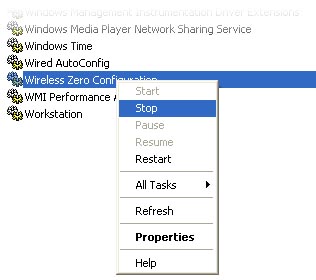
5) Close the window and relax.
I did this and it never disconnected for the rest of the morning… bliss.
The only problem with this, as mentioned above, is that you have to go through these steps every time you want to connect. If you turn off your computer and turn it back on, the service will remain stopped and you won’t be able to connect. It’s as simple as following the steps above and selecting Start to restart the service but how annoying, right? The PCWorld article has the answer:
Open Windows Explorer and navigate to C:WindowsSystem32 (or C:WinntSystem32 if you’re running Windows 2000). Locate the file net.exe. Right-drag it onto the desktop and choose Create shortcut(s) here when you drop it. Click twice slowly in the filename area and name the shortcut Stop WZC. Right-click on the shortcut, choose Properties, and click on the Shortcut tab. The Target field will probably show C:WINDOWSsystem32net.exe. Append a space to this, followed by ” stop wzcsvc” (don’t forget the space before stop). If you like, repeat these steps and create another shortcut to start the service; just replace “stop” with “start”.
Wonderful! thanks PCWorld
< Take Action >
Comment via:
Subscribe via:
< Read More >
Tags
Newer

Jul 14, 2008
Want to self-publish? My review of Lulu.com
I liked Lulu the best from my research and chose them to publish my client’s book. Here are my impressions about the whole writing, publishing, and uploading experience.
Older
Jul 04, 2008
"Customer service"
I want to address a conversation I had with a Cox cable technical support rep yesterday.