Technology Tamer icon
email twitter linkedin
I am a Technology Tamer located in San Diego (but working virtually anywhere). I help individuals and small businesses take their ideas and talents to new heights using simple, easy to manage technology. Whether it's using the internet to find new customers with a web site, optimizing or replacing existing hardware, or finding technology that helps you be more productive away from office, Josh Can Help.

Posts tagged...

Posts Tagged ‘Technology Marketing’

Spam: what is it? what does it do? why am I sending it? who cares?

November 4th, 2008
Josh

I had an interesting conversation with a colleague recently about what constitutes spam email and how we could go about avoiding it. It’s safe to say that we had differing opinions about the matter and I think it’s worth talking about those differences.

Spam is…

What is spam? My personal definition of email spam is this:

Unrequested crap in my inbox that wants my attention and has the intention of taking my money or time.

Spam is unrequested crap. Spam is an email that I receive because I signed up for a different list. Spam is email I can’t seem to stop that wants me to buy something. Spam is when organizations and charities and movements think they can make me passionate about an issue by constantly reminding me about it (see: Obama campaign and wildlife organizations). Spam is email I get that I don’t want, even if I’m aligned with the company or peolpe that are sending it.

That’s spam in my mind but there’s a similar definition that fights for mind space and clouds the issue.

Spam is illegal.

Because of the well-meaning CAN-SPAM Act, spam is typically defined as illegal emails. Spam, according to the Act, uses “false or misleading header information,” contains “deceptive subject lines,” does not ” give recipients an opt-out method,” is not “identified as an advertisement,” and/or does not “include the sender’s valid physical postal address.” This means that companies are free and clear to send me as much email as they want as long as I know it’s an ad, I can trace it back to them, and I didn’t tell them explicitly to stop. That’s a start.

What the CAN-SPAM act does in theory is reduce the number of “well-meaning” commercial organizations sending out marketing emails. I’m sure this act reduced the email in my inbox which is very kind but not exactly what I’m getting at. What about companies that follow the rules but still irritate me and make me want to avoid what they’re selling? They won’t get in trouble but aren’t they going to lose a customer?

What about everything else that makes spam annoying?

Spam is unrequested.

The disagreement I had revolved around what constitutes responsible emailing. My colleague is of the mindset that as long as we aren’t breaking the rules, risking litigation, or getting swear word replies, we’re doing the right thing. There’s no “No Email” list out there like the Federal “No Call” list right?

My point is that if you intend to send emails to people you think might want to buy your product, you should be making sure that you’re sending them out in the right way lest you get a hold of people like me who really hate getting emails they didn’t ask for. If there’s nothing telling you not to do something, is it always ok to still do it? It’s not illegal for me to give you the finger on the I-5 when you cut me off so does that means it’s always the right reaction?

Spamming lists of people does not constitute good marketing.

I asked a Christian that I respect very much a question about her faith one time. She said that people who do not believe Jesus died for them will, unfortunately go to hell. I asked her, what about people who have never heard of Jesus before they die? What about newborns? What about agnostics in Muslim countries? Or eskimos? She said that you’re given a free pass if you’ve never heard of him which I thought was a really nice thing.This, I can imagine, takes a little bit of stress off of people who feel compelled to spread the word. Imagine if you felt the guilt of millions of people going to hell because you never got around to telling them about Jesus? Yikes!

I propose the same thing for anyone doing any kind of marketing. If someone does not hear about your product, it doesn’t mean that you failed. Sending out 1,000 emails to people you’ve cultivated or purchased under the guide of “spreading the word” is an old tactic, a poor way of marketing, and just lazy.

To take it a step further, eating away at your brand by bothering people that may or may not fit your demographic is actually the opposite of marketing, you’re now working for your competitor. I promise you, companies that spam me don’t get my money and there’s two reasons for that:

  1. I don’t buy things from emails I receive. It’s never happened.
  2. The things I buy are, incidentally, from companies who don’t send spam (to me at least)

Let’s look at that second thing more closely…

If I don’t buy things from emails, how in the world do I hear about them?

Sounds crazy right?

  • I bought a TV (half bought, half gift) recently. I bought it from Frys.com (who do send me emails but I requested them) but not because I got an email about it. I was researching TVs on a forum (a car one no less), read some honest reviews about a Panasonic, also read a post about how cheap it was, and bought it from that. I used the Electronics community section of VWVortex.com to find it and read reviews at Newegg.com to confirm. Not a spec of marketing influenced me (I never even went to Panasonic’s site). I bought it from Frys.com because of the price.

  • I’m about to buy a netbook (ultra-small laptop) to replace my aged and dying/dead Dell Latitude (I’d say almost a decade [estimate] of service is a pretty good run). I’ve read blog reviews, owner opinions, and, of course, opinions on VWVortex.com. I’m split between the Dell Mini 9 and the Asus EEE 1000HA. I found out about the Dell from a blog I read a lot, I found out about the Asus from random tech news. I’m making my decision similarly to the TV but also reading a lot of objective reviews. The other piece of the puzzle is where I’m going to buy it from. If I choose the Asus, I’ll buy from Newegg, always. They’ve built a great reputation in my mind and in the mind of others and their price is, 9/10, the best. Even if it’s $20-30 more, it’s still better to buy from them. If I choose the Dell I have to buy it from them.

  • I bought a new car a while back, a Honda Element. I bought it used from a dealership and, despite all of their pushing and prodding, I didn’t buy it from them because they bugged me to. Honda made a quirky, great-looking, functional, interesting vehicle and I wanted one for years. I knew I would buy one eventually and, when the opportunity presented itself, I jumped. I didn’t buy from them because of TV commercials or emails or anything. I was there, they had the car, price was good, trade-in was good, and the guy wasn’t a COMPLETE asshole. Plus, I wanted a Honda. No ads, no emails, nothing. Like with the other two, I wanted it, read about it, and grabbed it.

I’m not your average consumer…

…but does that really matter?

Plain and simple, spamming people with emails or coupons in the mail or phone calls or aggressive in-person marketing all does the same think: make a mark AGAINST your company. I might be in the minority that knows how to buy things but, guess what, I’m also the one that’s giving free advertisement to websites and companies that I like just because I’m compelled to do so. I have no problem with recommending someone to Newegg like I would have no problem recommending a friend to another friend to get something done.

You might think you’re reaching more potential consumers and winning by stuffing my multiple inboxes with crap and you might be able to justify it with phrases like “brand awareness” and “front of mind” and “positioning” (if you’re using that to justify spam, you’re unclear on the concept). The problem is, you’re also alienating the few and the vocal, like me. I’m going to talk your company down if you’re ever brought up, I’m going to convince people not to buy from you because I don’t like your tactics, and I’m going to blog about you to anyone who will read.

There’s a fine line between being persistent and being annoying.

Forget the PUSH, create the PULL.

What to do with great ideas (part 1)

October 20th, 2008
Josh

I read somewhere that the worst thing that could happen to someone, especially someone with any kind of entrepreneurial spirit, is a great idea. Great ideas suck the life out of you, turn you into an obsessed lunatic, and can leave you with an empty home and an empty bank account.

After this last 2 weeks, I totally understand what that means.

See, I had a great idea at the end of last month. It started out as a cool idea (which is far less dangerous) but after talking with someone else about it, it turned into a really good idea. Now, after several brainstorming sessions, it’s become a GREAT idea and there’s no turning back.

I wanted to write about this great idea not to actually introduce the idea (because that would be silly at this point) but to chronicle what’s going on and what I’m doing about it. I look forward to more of these great ideas in the future and I hope to learn from my mistakes as well as my good moves. Also, if you have a GREAT idea and don’t know where to start, maybe this will help.

First, find someone.

Find someone and find them quickly, especially if you have sense that your idea is a really good one. Find someone you trust and find someone that knows what they’re talking about with respect to your idea. If you have a software idea, talking to an English major might not be too helpful, especially as you’re trying to put the different pieces together.

Also, make sure this is someone you can trust. The chances that your idea would be stolen and implemented without credit to you is pretty low but the closer to zero the better.

So, step one, go talk to someone you trust, someone that knows what they’re talking about, and someone that might want to help. It might be hard to find the right person but this is a critical step. Here’s a few hints:

  • How did you figure this idea out? Is there someone you work with that could help you? Be very careful about the fine line between proprietary information from the company and your own idea. The closer tied to the company you work for, the easier it might be to get sued.
  • Are you in school? Professors are great resources for things like this. They like to help students (most of them) and it’s unlikely they would be motivated to steal your stuff.
  • In my opinion, finding someone you trust is the most important thing. If you don’t have anyone that really knows what you’re doing, at least find someone with half-a-brain that you can trust.

Talk to this person you find, blab the whole idea, and then get their honest feedback.

Second, get it down on PAPER.

Literally on paper. Paper and pen is underrated these days (ever thought that would be said). Write furiously, draw sketches of what it looks like, take notes, just get it all down. Get the idea as it is and get the idea of what it could be. Write down everything you want it to do/be and everything it could do/be. Get everything down, the bad, the good, the ridiculous, the impossible, put it all down. Do this with the person from above if they want to be involved or by yourself if not. Keep taking notes for a few days, mull it over, let it sink in.

The other thing to say about this step is that you might find yourself with an incomplete plan and a sudden urge not to chase after this idea. You also might get so caught up in planning this thing out that you never end up doing it. Be very “present-minded” as you’re planning out your idea so you don’t miss any internal red flags and yuo’re sure you want to commit a piece of your life to this project.

There’s no substitute for a good plan that outlines everything you could expect in the beginning but don’t wear yourself out planning absolutely every single move you are going to make.

Third, get it down on computer.

Now it’s time to boil that plan down a bit. Type your notes up and start mocking things up that need pictures. Here’s a few tips:

  • When you transfer into a computer, write it in the most functional way you can. If your idea is a new business, format it like a business plan. This won’t be your final copy but the closer to the final copy you can be thinking, the less work later.
  • If you’re working with 2 or more people on this, use something like Zoho or Google Docs so everyone can share. There’s no reason to be emailing master documents between people and risk losing changes. Just put it on line and relieve some stress.
  • Remember to always be painting a picture. If you can use Photoshop, make realistic models of the interface you want to design or the web page you want to build. Make a video, draw something on paper and scan it into your computer, take a screenshot of a similar site and change it around in a Paint program. You’re going to need to explain things to people eventually (or right away) and if you can show them a little piece of the reality you’re creating, you’ll go a long way towards selling them on the concept.

Fourth, think long and hard about the money, the time, and the marketing.

Listen, I haven’t been neck deep in business forever but if there’s one thing that I know it’s that this is where things quickly break down. If you’re taking out loans for this great idea, you better have a solid plan on how you’re going to pay them back. If you’re using your down payment money for your house, make sure you have things in place to pay yourself back.

Also, consider how much time you really have to put towards this project. If you off-the-cuff assume that you’ll do all the HTML or writing or layout work but you have a full-time job and a family, think again. Time doesn’t just come from nowhere and you may have to resort to paying people to accelerate the process. Figure in extra money for staff, for incidentals, and for yourself.

Finally, and this might be the hardest, come up with a plan for how you’re going to get the word out there. Great products, great websites, and great blogs don’t just appear and suddenly become popular. Even if you’re offering the most amazing thing in the world, you’re still going to need to get the word out there.

Come up with an idea of how many people you need to reach and then figure out how you’re going to talk to those people. You can’t just say “email marketing” if you don’t have already have a list of people that want to hear from you (unless you’re a spammer). Your marketing plan won’t go anywhere if the only thing written down is “website.” How will people find your website?

Good luck with your great ideas!

What to do with downtime: slow-going tips post #1

October 10th, 2008
Josh

Introduction

Anyone charged with finding business for themselves dreams of the days when you’ll be able to reject more projects then you take. In the meantime, drumming up business can seem like a very daunting thing to do. There are lots of places to find ideas but what will work for you depends on what work you do, what you like doing, and what resources you have at your disposal. It can be frustrating to face an empty inbox or a clear schedule but if you’re not going to get out there and do the leg-work, no one will.

I’m new to all of this… how can this help?

I’ve worked with several people who wanted to increase the amount of paying customers they were seeing. Together, we came up with a few ideas for how this could be done. Some of these things work and some of them don’t but if you’re at a slow spot, it’s certainly not going to hurt you to market yourself a little bit.

Idea #1 - More/better search-able content.

If it’s been over 6 months, it’s time to change, update, and add to the content on your website. Even if your information is timeless, correct, full of tasty keywords, and prolific, it pays to continue to build on what you have. I can’t think of one popular site out there that has information on it that doesn’t change. What to write? You can detail the services you offer. Do you teach a class? Are you attending or speaking at an event? Do you do something that no one else does? Write about it and post it on your site. Search engines can’t do much to find your site without text and if your site is just a few sentences and your phone number, why do you have a website? Tell a story about yourself.

Contact me if you need help coming up with ideas, want a second pair of eyes, or you’re not sure how to make your content as findable as it could be.

Idea #2 - Strategic flyers

Internet marketing is one piece of the puzzle, but maybe you’re missing another big piece. Put a flyer together (or have someone like me do it for you) and put it in coffeeshops, post it on college campuses, and tack it to appropriate corkboards locally. Not everyone uses the internet to find everything they need (I know, crazy, huh?). Get yourself out there locally and don’t be afraid to talk to different people.

I can help you lay out a flyer, figure out what to say, and make sure that it’s optimized for printing. I also know some amazing print designers if you want to take it to the next level.

Idea #3 - Hit the streets

Talk about what you do to everyone you meet. Almost anyone I meet for the first time knows what I do after a minute or two of conversation. I’m not pushing it down anyone’s throat but it can be a great icebreaker, first of all, and it can always lead to paid work. Not meeting many people? That’s not true, you meet new people all the time. You talk to people at the store, on the street, to people ringing you up, to other people in line, maybe to classmates. If you’re afraid to put yourself out there then it’s going to be hard to drum up any business.

Let me help you design a business or use the internet to find groups in your area.

Remember: it’s only as hard as you make it.

This kind of leg-work can seem like the hardest thing in the world to someone who doesn’t know where to start or has no experience in it. Working for yourself, even if it’s a part-time, off-hours hobby or niche, has to involve putting yourself out there and making your services known. Answering ads and helping friends only goes so far with respect to interest generation. Once you’ve milked your network, it’s time to move beyond.

The one thing I keep in mind when I post on this blog, reach out to a potential client, or hand a business card to someone is that I’m a unique person offering a unique service. I might not be the only one doing what I’m doing but only I do it the way that I do. There are people out there who don’t know me that couldn’t find a use for what I’m doing if they tried (these are the people falling behind their peers, FYI). There are also people who aren’t a fan of my aesthetics or my color choices or my layout tendencies. These people will never call me for a job and will never use my services. There are, however, far more people that could use what I have to make their lives easier. There are small businesses out there who want to do more with the internet but just don’t know how. And there are individuals who just want what they have to work. I can help all of these people but, until I find them or until they stumble onto my site, they’re putting up with processes and equipment that does not work.

Take a chance, risk a little bit of rejection, and make yourself known. You’ll be glad that you did.

HTML emails: the last word (until everything changes again)

September 11th, 2008
Josh

Introduction

Here is everything I know about creating HTML emails. This is the most boring and most useful post I’ve ever created by far. This is the aggregate of a lot of research and my own coding and testing. The title is bold, I know, but the information is solid.

I’m new to all of this… how can this article help me?

That depends. If you’re not going to be doing any coding then this post will help you understand what kind of work has to go into HTML emails to make them consistent and, hopefully, effective. If you’re designing the emails but not creating them then you’ll have an idea of what you’re working with and what you’re allowed to do.

Why HTML emails?

HTML emails are preferred so they are more likely to be read. This is a bit subjective but the concensus on-line is that, as long as they are designed properly and sent responsibly, HTML emails are a great marketing tool.

HTML emails are, however, still hated by some so this is a case of “less is more.”

Emails from you are easily identified and can look similar to your home page. This allows for consistent branding across all mediums, if done correctly. More about this in the “style” section.

HTML emails connect users to the home page, literally through through links and visually through the layout and colors.

HTML emails are “cutting edge,” pardon the expression. They are impressive and colorful and are a major part of marketing campaigns in all industries. Sending out a properly-coded and carefully designed HTML email says that you’re current

HTML Emails Are Different than brochures

  • Inconsistent across email clients instead of exactly the same
  • Much less expensive to produce and create
  • More difficult to get it “just right” (design limitations)
  • Completely different medium and delivery
  • Less mobile than email for most people
  • Different timing (in the moment rather than later)

HTML Emails Are Different than Web Sites

  • More email clients to consider than browsers
  • Much less CSS support (mostly just text formatting)
  • Also more difficult to get it “just right” (design limitations)
  • Tables are recommended above CSS layout for emails
  • Explicit code is the name of the game
  • Less time and audience attention to get your message across

HTML Emails Are Different than text emails

  • “Pops” better out of an email box
  • More to consider than just the content (in addition to the content)
  • Plain text doesn’t break down (plain text is as consistent as it gets)
  • Accessibility concerns with HTML emails that don’t exist with plain text

The basics of HTML email design

  • Different email clients do different things and it’s hard to predict and test for everything.
  • Concentrate on the lowest common denominator and make sure the content layout makes sense.
  • Assume that images will be blocked and layout will break.
  • Make sure the emails degrade gracefully. This means that alt tags need to be used, images should be used sparingly and table layouts should be as simple as possible.
  • More time and effort should go into the motivation and the message rather than the visual design.
  • Design is not a substitute for a relevant message.

Understanding email campaigns

Permission is king. If you didn’t get someone’s permission before you sent the email then it is probably considered spam. There are a lot of companies out there just yelling their name and products and, at best, they’re getting lost in the chaos. At worst, they’re generating negative attention for themselves. When it comes to marketing, bad attention isn’t just attention, it’s a brand killer.

Quality above quantity of recipients. If you have a list of 5,000 people that may not have heard of you before and might have interests that match your product, you have little more than a bullhorn and a crowd. If you have a list of 150 people that know what you’re offering and want to hear more, you have a captivated audience. It’s easy to assume that all people need to hear is what you’re offering and they’ll come running. The fact is, if there’s any sort of negative connotation to your brand (for example, showing up unnannounced in their email box), they’re not going to want what you’re selling. Strive for targeted lists of interested people instead of just bigger ones.

At the very least, your emails need to be relevant to your recipients. If someone signs up for a specific newsletter or a specific notification list, that does not mean they want everything that your institution can send out. Send less emails with better, more relevant content and you’ll see better conversion rates. In the same vein, if you can personalize emails, do it. Most HTML sending services allow you to input the names of your recipients (along with other variables) so take advantage.

Mass HTML email senders have been likened to a “loaded gun.” First, there’s nothing stopping you from spamming thousands of people, on purpose or accidentally. All it takes is one bad batch and your domain might get blacklisted from your recipients’ email cients. This is definitely a bad thing; getting blacklisted from Hotmail or Gmail means you’ve lost the ability to send to millions of people. The responsibility to send out relevant, targeted emails to the right people is yours.

A good thing to keep in mind, along with the other points so far, is that these bulk emails (or any emails) cannot be recalled once they are sent. It’s easy to shoot off an email to a co-worker or a friend and correct yourself later but it’s not possible with big email campaigns.

In the same vein, it’s important to test your emails in several different email clients. We test with Outlook 2007, Yahoo, Gmail, Hotmail, and the Windows Mobile 6 included email client. There’s no substitute for checking different email clients and your recipient list should give you a good idea of where to look. If you have home accounts with Cox or AOL, try these as well if you can. The best you can hope for is that all of the styles, images, and table layouts come through OK. The worst you should have is a broken design but text content that shows up legibly.

Last but not least, make sure you are up to date on the CAN-SPAM regulations. In a nutshell, here they are from the FTC website:

  • It bans false or misleading header information. Your email’s “From,” “To,” and routing information – including the originating domain name and email address – must be accurate and identify the person who initiated the email.
  • It prohibits deceptive subject lines. The subject line cannot mislead the recipient about the contents or subject matter of the message.
  • It requires that your email give recipients an opt-out method. You must provide a return email address or another Internet-based response mechanism that allows a recipient to ask you not to send future email messages to that email address, and you must honor the requests.
  • It requires that commercial email be identified as an advertisement and include the sender’s valid physical postal address. Your message must contain clear and conspicuous notice that the message is an advertisement or solicitation and that the recipient can opt out of receiving more commercial email from you. It also must include your valid physical postal address.

Basic HTML elements used

p
span
img
a
table
tr
td

Basic tags used

style=
width=
align=
colspan=
href=
cellpadding=
cellspacing=

Basic CSS properties used

background-color:
border:
color:
font-size:
font-style:
font-variant:
font-weight:
letter-spacing:
line-height:
list-style-type:
padding:
text-align:
text-decoration:
text-indent:
vertical-align:
white-space:
width:
*font-family: this doesn’t work in gmail but there’s nothing wrong with adding it for the other clients.

HTML Email Layout

Tables determine the layout. If you are not trained in table design, good for you, you’re on your way to being a great web designer. You do, however, need to have a solid understanding of them to build HTML emails.

No head, html or style tags are used as these are often stripped out by the email client before viewing. HTML editors might add this and, while it won’t cause any problems, it should be removed. Keep in mind, the big client that strips these is Gmail. If you’re not concerned about styles in Gmail, it is ok to use this element but make sure it appears WITHIN THE BODY TAGS, not before.

Be sure to close all HTML elements! Use an HTML checker like the one in PSPad to find errors easily.<br /> - Wrapper table should be used with a 98% width if a centered layout or background color is desired. Content section is a nested table inside the wrapper table. For full-width designs or left-justified designs without a background color, the wrapper is not needed.

For 2 or more columns, the “colspan” and “width” tags must be used together. Remember the spreadsheet model and add as many columns as you need with the first row of cells. Again, make sure to add a wrapper table if you want a background color or you want the design to be centered in the window.

Design for the preview pane of email applications. That means you’ve got about 500, 600 pixels tops for your email designs. Most email windows do not take up the entire screen (do yours?) and some people intentionally make them smaller. Make sure your main content section is slim, under 600 pixels, and that your logo, tag line, or another “grabby” piece of content is near the top-left corner. Some email applications, like AOL, allow for about 150 to 200 pixels to make sure your content will appear.

Styling your email

Simple CSS is widely supported and can be used in all HTML elements with a style tag. This is called “inline” styling and is the best way to apply CSS to an HTML file being sent. This is what I mean by “explicit;” all styling cues are added to each element inidividually. To style two different paragraphs the same, the same style tag and CSS properties need to be added to both. Keep in mind, sometimes the body styles don’t carry over; stick to colors and minor “throw-away” styles in case this element is tossed out.

Some sources recommend CSS shorthand to cut down on file size while others say that it should be written explicitly. Declarations like “margin: 0″ are usually safe but it might be a good idea to spell out font declarations completely. This helps the design process down the line.

Use images carefully and correctly in your design. Pictures, icons, and headers are great but can easily become cluttered and bloat the size of the email. Turn down image quality and use images that enhance your design or draw attention where you need it. Also, never send an all-image email. Some email clients block images as a default so your message might be lost and/or might be marked as spam.

Make sure you always include the width and height in the image tag for every single image. This ensures the empty placeholder images don’t get stretched and completely throw your design. Also, store the email images on a web server, preferably in a folder separate from website images, for example, in /images/email not /images. And don’t delete them.

General notes

  • link element not supported, style elements barely supported so use in-line styles to be safe.<br /> Since <style> elements are unstable, selectors are as well.
  • 530px is a safe width for certain clients and certain preview panes (AOL in particular). Not including AOL, 600px is maximum.

Gmail notes

  • Keeps only the HTML between the body and /body tags. Discards the rest.
  • Removes any style element and its content, even if it’s within the body element.
  • The font size is bigger in table elements, so you’ll probably have to force it with font-style
  • Gmail removes CSS rules with the property height.
  • Gmail removes CSS comments found inline.
  • Gmail doesn’t allow the url() value and will completely remove a CSS rule that uses it.
  • Gmail is one of the only email clients that does not use the font-family: property
  • Images are blocked by default but alt= tags are displayed

Hotmail/Live notes

  • Keeps only the HTML between the body and /body tags. Discards the rest.
  • The style element and its content is preserved if it’s inside the body element.
  • Hotmail will completely remove any CSS rule that uses a url() as its value.
  • Hotmail removes CSS comments found inline.
  • Hotmail does not block images by default but Live does

Yahoo notes

  • Keeps almost intact the complete original HTML sent and puts it directly in a div. So if you had any of these in the HTML, they will be found in the middle of the Yahoo! Mail HTML: DTD declaration, comments, html, head, title, style and body elements, etc. But, the DTD declaration won’t be taken in consideration by the browser since it’s in the middle of the page, same thing for the title element;
  • Will rename the body, meta and link tags xbody, xmeta and xlink, so they will be “disabled”. This means that no external stylesheet can be linked to the document through the link element.
  • Be careful with style elements; when replying or forwading this message, Yahoo! Mail will convert your style definition as plain text and your declarations will appear in the message.
  • Does not block images by default

Outlook notes

  • Outlook support varies greatly across versions; older versions have better CSS and HTML support
    head, html, meta, style elements are removed.
  • img alt= tags are removed so images that are not shown will not be replaced with text.
  • 2003 and 2007 blocks images by default

AOL9 notes

  • “preview pane” is extremely tiny. Make sure to design your emails to peek out enough from the preview pane.
  • HTML code needs an extra line break or two after the final /HTML tag, or you’ll see weird “equals signs” in your email
  • Blocks images by default, alt= tags are not displayed

HTML coding sources

MailChimp HTML email guide

How To Code HTML Email Newsletters

HTML Email Tips for Web Designers

Word 2007 HTML and CSS Rendering Capabilities in Outlook 2007

CSS support in webmail clients/a

Optimising CSS usage for email

A guide to CSS support in Email

Email marketing sources

Email Marketing Strategies - Email Marketing “Must Dos”

How To Build a Basic Email Marketing Capability

I learned something today

September 9th, 2008
Josh

Introduction

There’s usually five hard ways to do something without any kind of guarantee of an available easy way. Sometimes there is an easy way, sometimes there’s just an easIER way, and sometimes there’s just hard ways. Realizing that some things just take hard work is an important step towards growing up (regardless of your numerical age) but it’s also the kind of thinking that can get you stuck. I’m a fan of hard work and, as such, sometimes I work a lot harder at something than I should. Case in point, the story I’m going to share with you.
I’m new to all of this… how can this article help me?

Approaching your technology problems can be daunting - especially if you know only one way to do things and that way is a P.I.T.A. When it comes to computers and the internet, it’s important to always keep in mind that there are probably 5 pieces of software that you never knew existed that do exactly what you need, 5 pieces of hardware that could solve one nagging problem, and a 100 people out there who are better trained than you are and are chomping at the bit to help you out (that’s me). All you have to do is keep your eyes open, your mind working, and your homepage on Google and you’re a step ahead of the rest.

Sometimes, there’s no need to swim uphill

So I know a guy with a blog. I built the blog for this guy. Blood, sweat, tears, and love went into putting together this blog. Then, even more bodily fluids went into typing and editing his blog posts to post on his blog on a regular basis. In the meantime, exponentially more effort went into editing, designing, copyrighting, and publishing his book. I was paid for most of it but, because the project was close to me, many hours flew by sans compensation (willingly of course).

He wrote a lot of material all at once and sent it over to keep me busy and have a “buffer.” This buffer was the only thing he would write for months despite my gentle insistence and cajoling. He said he liked to write but, in the end, if we actually like to do things, don’t we just do them? I like to write and, coincidentally enough, I end up writing a lot (here, at work, emails, etc). It occurred to me that maybe he wasn’t into this writing thing after all.

Still, I was working for him and if he wanted to write, well, dammit, I would do everything I could to make him write. So I bought him books about writing, wrote him blog posts about writing blog posts, and came up with a massive list of every possible industry topic he could write about. I kept (and keep) editing his buffer posts, every week posting less and getting closer to the finale of all of his earlier efforts.  I made him buy cards to promote his blog and his book, despite having very little left to post. I even added my own posts as the “administrator” of the blog talking about what I’ve learned and what to expect. In the end, I was working several hours a week on a blog that wasn’t mine for a purpose that I wasn’t clear on. I had stopped taking payments but kept trying to edit and post what was left. The idea started out so exciting and I was watching it peter out like a match in the rain.

New approach

This client had done radio work back in the day and, every now and then, reminisced about his days behind the mic. His voice is very calming. You can always hear his smile because he’s always smiling. On the phone or in person, he’s always wearing that big, friendly grin and telling you something to which you ought to be listening.

The idea of a podcast floated into my consciousness a few months ago but, in my head, it sounded like an expansion plan and I was not interested in expanding something that wasn’t going anywhere. The podcast idea wouldn’t leave my head, however, and today, after a rousing conversation about the matter, I just blurted it out.

“This blog thing just isn’t working. He should just do a podcast.”

And, with that, this blog thing was solved.

Despite what he says, at least for the time being, this client just doesn’t want to write. There’s no point in forcing something that isn’t happening. He has, however, had his ears open for a broadcasting gig hosting his own show on the radio without much luck.

A book and a blog, if it takes off and starts gaining attention, is just going to get more audience members for the blog and, at best, a great offer for a new book. For someone that finds it difficult to make the time and energy to write, this is a punishment in disguise.

If, however, he took this great wisdom he has, spoke it into a digital recorder, and emailed the final product to me, he’d never have to write another word in his life. The audio can be posted and hosted on the blog, submitted to iTunes, compiled and sold on a CD, or even be a spring-board to videos if he wanted. Not only that, if the audio broadcasts take off, there is the possibility of a book, sure, but it’s more likely that someone who knows what they are doing will want to keep him in the same format, the one that he’s succeeding at.

Exciting stuff

In the end, the solution to the problem was actually the expansion plan for the original idea. The middle point actually should have been the starting point. I kept trying to make something work that just simply wasn’t going to happen.

The way forward could be the one in your head, it could be the one in your friend’s head, or it could be the one that has not materialized yet. There’s no point pushing against a brick wall if, at the other side of that wall, there’s nothing you want. My mistake was not thinking down the road with the blog idea. I thought that, with a blog, he could go anywhere. But the blog was not only the barrier to entry, it wasn’t going to lead to anything better.

In the end, if you don’t know exactly what you’re doing and there’s not a big risk in taking your time, maybe it’s better to explore as many options as possible and see which one fits the best. If it sucks and sucks and sucks and you’re not getting anything out of it, chances are that you’re not going to continue doing it indefinitely (and that’s a good thing). Save your tenacity for the IDEA itself, not the execution. If you know what you’ve got is gold and it’s not going anywhere then you’re probably barking up the wrong tree. If I decided it was my calling to make hip hop beats, a blog about it probably isn’t the best way to go (though it might be). If I wanted to make money off graffiti art, it’s not likely that handing out fliers at the hot club downtown would get me anywhere (though it might).

There’s nothing wrong with trying something out… in fact, if you’re NOT trying out new things and exploring new markets, you’re definitely doing something wrong and probably selling yourself short. But you have to know when to bag it, when to try something else, when to stay true to your idea and just bark up a new tree. Staying true to yourself and staying true to your ideas means doing whatever is necessary. Plugging away over and over at something that isn’t going anywhere is doing a disservice to your talent and your product.

If you need some help trying to find a new tree, let me know.

New business card design

April 12th, 2008
Josh

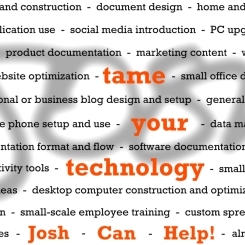
Sharing the front face of my next business card:

Josh Can Help business card design

For anyone following, this is my second iteration and definitely the one most closely related to what I’m actually doing.

The last business card I had made was mostly a product of me being completely enthralled with cartoonist and blogger extraordinaire, Hugh MacLeod of gapingvoid fame. I found his cartoons a few years ago and really enjoyed their honesty. Hugh made the great move of making his cartoons available as business cards through a site called StreetCards.com. Through a link on his site, you logged into StreetCards, picked an appropriate (or inappropriate) card, added your information, gave them the 16 digits, and waited for a shipment from the UK. I had nothing to promote besides my blog (a different one than this which didn’t even have ads on it at the time) but I felt like I needed an easy way to network and meet people.

Well, now it’s April 2008 and I need business cards… for a good reason. I wouldn’t say this whole JoshCanHelp thing is blowing up per say but I definitely have found myself in a couple situations where having a small piece of card stock would be handy. Designing a card has been on my to-do list for a few months but I always had it in my mind that I would learn the digital layout software Quark first and then submit a design to a local printer. Not only is the Quark thing on hold for the moment (I’m trying to pick an enormous, expensive software program to use and Quark isn’t winning) but I could definitely benefit from having something, ANYTHING, right now. So I drew up a few designs, settled the one I liked, set my free, simple drawing program to high resolution, and went to work.

The first thing I came up with is this:

Josh Can Help business card design

If you can’t tell, the black text is the same font as my website (Trebuchet MS) and the red text is Rockwell (a font I would have never chosen until I saw it used properly). I really liked how it turned out so I showed it to a few people. The main complaint was that the important message - tame your technology - was difficult to discern and should be larger. I also heard (and thought myself) that the red text should be larger than the rest.

Since I had made the original design as a plain image, I had to start over with the new design. This was actually a blessing in disguise because, instead of repairing what went wrong, I just rebuilt everything to the correct specs. I used Rockwell font for all the front text but dropped the descriptions down a bit. Instead of cutting letters and words off (intentionally), I continued the words on the next line (to add continuity) to make the most out of the space. For the “josh” in the background, I lightened it quite a bit and added a blur effect to take the concentration off of my name. Finally, I left the separators between the attributes as dashes instead of manually changing them to black dots (individually).

I’ll say this: it is difficult to come up with a design and a message that accurately conveys your sense of creativity and vigor and excitement while also concentrating on being somewhat original. I’ve seen some amazing business cards on-line and it seems insane to even try and compete with half of them. But, in the end, that’s simply not the point. Just like my resume is no comparison to other resumes out there, my business card is not at all a matter of out-doing other people out there. If I don’t make an impression in person, it’s unlikely that my card is going to open some magical door.

Layer-by-layer, inch-by-inch. The message is more effective as a snowball, building momentum and speed and power and influence over time, than as one massive onslaught. A better presence is made by just that: presence.

Your comments are welcome and highly desired. Thank you.